genusphere deployment: browser-based ZTAA without VPN clients
6 min read
I’ve been working with genua products since 2004. When genusphere came along, it changed how I think about remote access. Instead of punching a VPN tunnel and hoping your segmentation holds, users open a browser, authenticate, and reach exactly the application they need. Nothing else. No network access, no client software, no lateral movement.
This guide is what I wish had existed when I started deploying genusphere. It covers the architecture, how high availability actually works, how to set up Keycloak with hardware tokens like YubiKeys, and the migration path I recommend when moving away from VPN.
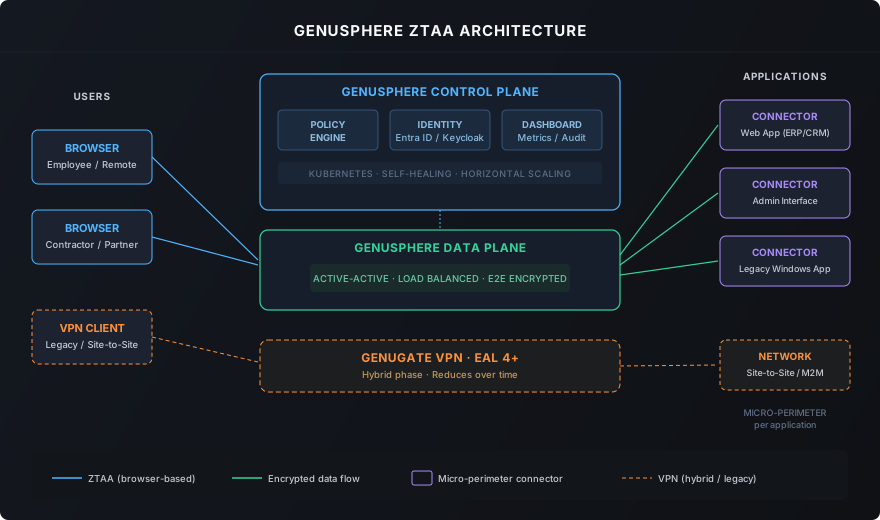
Architecture — how the pieces fit together
genusphere runs on Kubernetes with three layers. Once you understand these, the rest follows.
Control plane
This is where policies live. It handles authentication, session management, and the dashboard you use to configure everything. The control plane connects to your identity provider — Keycloak or Microsoft Entra ID — and enforces who gets access to what.
If the control plane goes down, Kubernetes restarts it. That’s one of the reasons the Kubernetes-native approach matters: you get self-healing without building it yourself.
Data plane
The data plane moves encrypted traffic between users and applications. It runs active-active — meaning multiple instances handle traffic simultaneously, not in a failover setup. Load balancing is built in. If one instance drops, the others absorb the load without interruption.
In practice, this means you don’t need to plan for maintenance windows to update the data plane. Roll one instance at a time, traffic keeps flowing.
Connectors
Connectors sit near the target applications and create a micro-perimeter around each one. Think of them as dedicated gatekeepers: each application gets its own connector group, and each group can scale independently.
This is the part that really differentiates ZTAA from VPN. A compromised session in one application cannot reach another application because the connectors are isolated. Lateral movement is architecturally impossible, not just policy-controlled.
High availability in practice
HA is one of those things that looks simple in a slide deck and gets complicated in production. Here’s how genusphere handles it across the three layers:
Data plane: Active-active with load balancing. You run multiple instances, traffic distributes automatically. If an instance fails, the remaining ones take over. No manual intervention, no downtime.
Control plane: Kubernetes handles this. If the control plane pod crashes, Kubernetes restarts it immediately. In a properly configured cluster, you won’t even notice. Existing sessions continue through the data plane — the control plane only needs to be available for new authentication and policy changes.
Connectors: This is where it gets interesting. You deploy connectors as connector groups — multiple connectors serving the same application. If one connector fails, traffic routes to the remaining ones. You decide how many connectors per group based on your availability and performance requirements.
The practical takeaway: genusphere doesn’t have a single point of failure if you deploy it correctly. The architecture is designed so that every layer can lose an instance without users noticing.
Identity: Keycloak, YubiKeys, and phishing-resistant MFA
Most environments I work in use either Microsoft Entra ID or Keycloak for identity. Both work with genusphere. But I want to talk about Keycloak specifically, because it opens up some interesting possibilities.
Why Keycloak alongside genusphere
Keycloak gives you full control over the identity layer. You host it yourself, you define the authentication flows, and you’re not dependent on a cloud provider for something as critical as who gets access to your applications.
In a typical setup, I deploy Keycloak in parallel with the genusphere rollout. While the genusphere infrastructure goes up, we configure Keycloak with the authentication flows the organization actually needs — not whatever the cloud provider decided is the default.
Hardware tokens: YubiKeys and FIDO2
This is where it gets concrete. Keycloak supports WebAuthn, which means you can use FIDO2 hardware tokens like YubiKeys as a second factor. The user plugs in the key, touches it, and they’re in. No SMS codes, no authenticator apps, no phishing risk.
Why does this matter? Because the biggest threat to any Zero Trust setup is credential compromise. If an attacker gets a password and an SMS code, they’re in. A hardware token is a different category — the private key never leaves the device, and it’s bound to the domain. Phishing doesn’t work.
In practice, the setup looks like this: - Keycloak runs as the identity provider for genusphere - Users register their YubiKey through the Keycloak self-service flow - genusphere enforces that authentication must come through Keycloak - The user opens a browser, authenticates with password + YubiKey touch, and reaches their application
No VPN client. No SMS. No lateral movement. That’s the stack I recommend for environments that take security seriously.
The same principle applies when the protected application is not a classic business app but a privileged DXP surface. I wrote about that pattern in Securing the Magnolia Author: Zero Trust for CMS + AI Threats.
Entra ID for hybrid setups
If the organization already runs Microsoft Entra ID, genusphere integrates directly. You get SSO and MFA through the existing Microsoft infrastructure. In practice, many environments end up with a hybrid: Entra ID for internal employees, Keycloak for contractors and partners who don’t have Microsoft accounts.
Deployment model
Kubernetes-native
genusphere runs on Kubernetes. Horizontal scaling, automated restarts, infrastructure-as-code. The control plane leverages Kubernetes for self-healing. Connector groups scale with demand.
If you already run Kubernetes, genusphere fits into your existing cluster management. If you don’t, this is a good reason to start — the operational benefits compound.
On-premises sovereignty
Unlike cloud-delivered ZTAA solutions from Zscaler or Cloudflare, genusphere is hosted and operated by the customer. Data never leaves your infrastructure. For German organizations with VS-NfD, KRITIS, or BSI compliance requirements, this is often the deciding factor.
Integration with existing genua infrastructure
genusphere doesn’t replace the rest of your genua stack — it extends it: - genugate stays as the perimeter firewall (EAL 4+ certified, still the gold standard) - genucenter provides unified management across genua products - genuscreen handles VPN traffic during the hybrid migration phase - genubox covers industrial remote maintenance under zero trust
Migration path: how I approach it
Every migration is different, but the pattern I’ve seen work repeatedly has four phases.
Phase 1 — Understand what you have
Inventory all applications currently accessed through VPN. Classify them: web applications, Windows legacy apps, admin interfaces, machine-to-machine traffic. Figure out which ones can move to browser-based ZTAA and which ones genuinely need network-level access. Be honest about this — not everything can move, and that’s fine.
Phase 2 — Prove it works
Deploy genusphere alongside the existing VPN. Pick a small group of web applications and a defined user group. Set up Keycloak (or Entra ID), configure connector groups, validate the authentication flow with hardware tokens if you’re going that route. This phase is about proving the model without touching production.
Phase 3 — Move application by application
Migrate incrementally. Web applications first — they’re the easiest win. Then legacy Windows applications through genusphere’s browser-based isolation. Monitor access logs, tune policies, expand the user base. The VPN keeps running for everything that hasn’t moved yet.
Phase 4 — Reduce the VPN footprint
Once most applications run through genusphere, shrink the VPN. Some environments keep VPN for site-to-site tunnels or machine-to-machine traffic. That’s normal. The hybrid phase ends when the remaining VPN scope is small and well-defined.
When genusphere fits — and when it doesn’t
genusphere is a strong fit when you need application-level access control, operate in a regulated environment, and want to keep your data on your own infrastructure. Hybrid workforces, contractor access, partner onboarding — these are the core use cases.
It’s not a replacement for every VPN scenario. Site-to-site tunnels, machine-to-machine communication, and some legacy protocols still need network-level connectivity. The practical answer is almost always a hybrid deployment: genusphere for application access, genugate VPN for the rest, reducing over time.
If you’re evaluating this and want to talk through the specifics of your environment, reach out.
FAQ
Does genusphere require a VPN client on the endpoint?
No. Users open a browser, authenticate through Keycloak or Entra ID, and land directly in the application they need. No agent, no client, no tunnel.
Can genusphere run alongside an existing genugate VPN?
Yes, and in most projects I’ve worked on, that’s exactly how it starts. The VPN keeps running for workloads that can’t move yet. genusphere takes over application by application.
What does the high availability setup look like?
The data plane runs active-active with load balancing. The control plane self-heals through Kubernetes. Connectors can be deployed as groups with redundancy. If a connector fails, traffic routes to the remaining instances automatically.
Can I use hardware tokens like YubiKeys for authentication?
Yes. When you run Keycloak as the identity provider, you can configure WebAuthn with FIDO2 hardware tokens like YubiKeys. That gives you phishing-resistant MFA without relying on SMS or app-based codes.